
Nissan Sentra Service Manual: CSC(concentric slave cylinder)
Exploded View
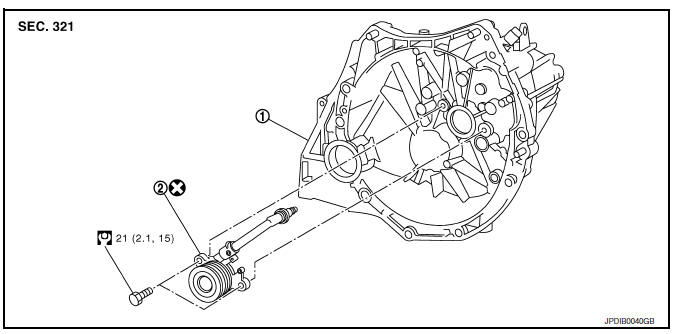
- Transaxle assembly
- CSC (Concentric Slave Cylinder)
Removal and Installation
CAUTION:
- Do not reuse CSC (Concentric Slave Cylinder). The CSC slides back to the original position every time the transaxle assembly is removed. This action may allow dust or contaminants to gather on the sliding parts and damage a seal of CSC causing clutch fluid leakage.
- Do not disassemble CSC.
- Keep painted surface on the body or other parts free of clutch fluid. If clutch fluid spills, wipe up immediately and wash the affected area with water.
REMOVAL
- Remove engine and transaxle assembly. Refer to TM-28, "Removal and Installation".
- Remove CSC bolts, then remove the CSC from transaxle assembly
INSTALLATION
- Install CSC to transaxle assembly, then tighten CSC bolts to the specified torque.
CAUTION:
- Do not reuse CSC.
- Do not install then operate CSC immediately, the piston and stopper of CSC components may fall off.
- Install engine and transaxle assembly in the reverse order of removal. Refer to TM-28, "Removal and Installation".
Inspection and Adjustment
INSPECTION AFTER INSTALLATION
Check for fluid leakage and the fluid level. Refer CL-7, "Inspection".
ADJUSTMENT AFTER INSTALLATION
Perform the air bleeding. Refer to CL-9, "Air Bleeding".
 Clutch piping
Exploded View
CSC (Concentric Slave Cylinder)
Clip
Clutch tube
Clutch damper
Bracket
Clutch master cylinder
Hydraulic Layout
Clutch tube
Lock pin
CSC (Concentric Slav ...
 Clutch disc and clutch cover
Exploded View
Flywheel
Clutch disc
Clutch cover
Input shaft
First step
Final step
Apply lithium-based grease
including molybdenum disulphide.
Removal and Installation
CAU ...
Other materials:
Steering column covers
Removal and Installation
REMOVAL
Remove the steering column cover screws (A), then remove the
steering column upper (1) and lower (2) covers.
NOTE:
Shown with steering wheel removed for clarity.
If necessary, rotate steering wheel to access steering column
cover screws (A).
...
Diagnosis description : system readiness
test (SRT) code
System Readiness Test (SRT) code is specified in Service $01 of SAE J1979/ISO
15031-5.
As part of an enhanced emissions test for Inspection & Maintenance (I/M),
certain states require the status of
SRT be used to indicate whether the ECM has completed self-diagnosis of major
emission s ...
Bluetooth® Hands-Free Phone System voice commands
To access the Bluetooth® Hands-Free Phone
System voice commands:
Press the button.
Say “Call� and then a name in the vehicle
phonebook to call that entry. Otherwise, say
“Phone� to access various phone commands.
If the Bluetooth® has been set to “Off�, the
system announ ...
