
Nissan Sentra Owners Manual: Automatic anti-glare rearview mirror (if so equipped)
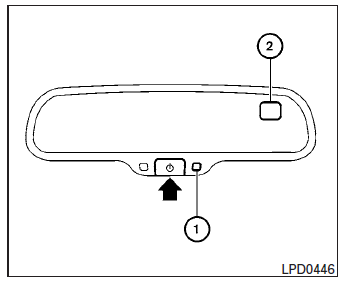
The inside mirror is designed so that it automatically dims according to the intensity of the headlights of the vehicle following you. The automatic anti-glare feature is activated when the ignition switch is in the ON position.
NOTE:
Do not hang any objects over the sensors 1 or apply glass cleaner to the sensors.
Doing so will reduce the sensitivity of the sensors, resulting in improper operation.
The indicator light will illuminate when the automatic anti-glare feature is operating.
With the ignition switch in the ON position, press
the  button as described:
- To turn off the anti-glare feature, press and
hold the
 button for 3-6
seconds. The indicator light will turn off. - To turn on the anti-glare feature, press and
hold the
 button for 3-6 seconds
again. The indicator light will turn on.
For more information about the compass 2 and compass features (if so equipped), refer to “Compass display� in the “Instruments and controls� section of this manual.
 Rearview mirror (if so equipped)
The night position 1 reduces glare from the
headlights of vehicles behind you at night.
Use the day position 2 when driving in daylight
hours.
WARNINGUse the night position only when ...
 Outside mirrors
The outside mirror remote control will operate
only when the ignition switch is in the ACC or ON
position.
Move the small switch 1 to select the right or left
mirror. Adjust each mirror to t ...
Other materials:
Battery
Exploded view
Battery frame
Battery rods
Battery cover
Battery bracket
Battery tray
Battery
Front
Removal and installation (battery)
Removal
Loosen the battery terminal nuts and disconnect both battery negative
and positive terminals.
Caution:
To prevent damage to t ...
Main line between dlc and hvac circuit
Diagnosis Procedure
1.Check harness continuity (open circuit)
Turn the ignition switch OFF.
Disconnect the battery cable from the negative terminal.
Disconnect the following harness connectors.
Ecm
A/c auto amp.
Check the continuity between the data link connector and the a/c ...
Air conditioner operation (if so equipped)
Start the engine, turn the fan control dial to the
desired position, and press the
button to
activate the air conditioner. When the air conditioner
is on, cooling and dehumidifying functions
are added to the heater operation.
The air conditioner cooling function operates
only whe ...
