
Nissan Sentra B18 (2020-2025) Service Manual: System
Can Communication System
System Description
CAN (Controller Area Network) is a serial communication line for real time application. It is an on-Nissan Sentra vehicle multiplex communication line with high data communication speed and excellent error detection ability. Many electronic control units are equipped onto a Nissan Sentra vehicle, and each control unit shares information and links with other control units during operation (not independent). In CAN communication, control units are connected with 2 communication lines (CAN-H line, CAN-L line) allowing a high rate of information transmission with less wiring. Each control unit transmits/receives data but selectively reads required data only.
Diag on Can
System Description
SYSTEM DIAGRAM
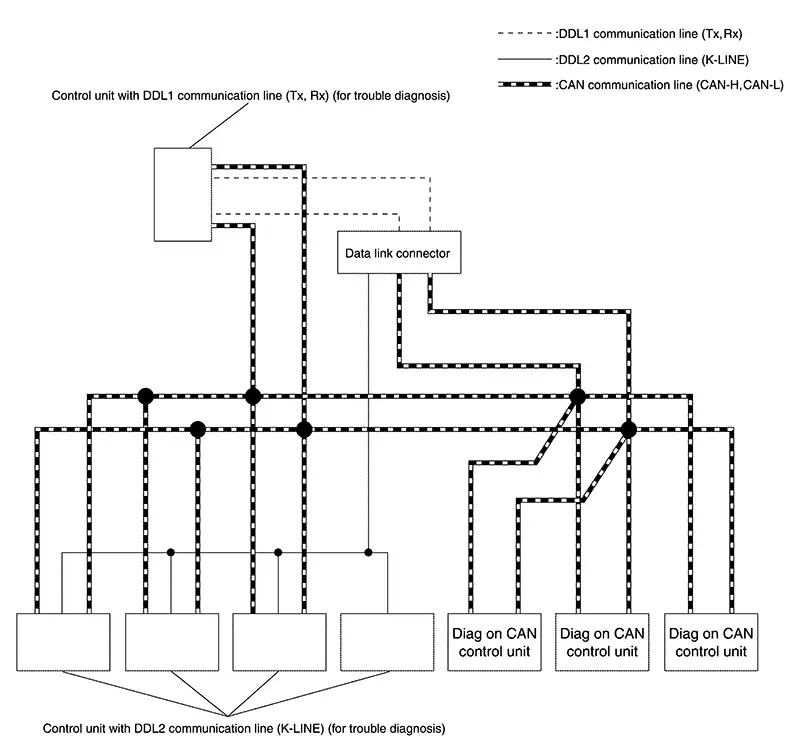
|
Name |
Harness |
Description |
|---|---|---|
|
DDL1 |
Tx Rx |
For communications with the diagnostic tool. (CAN-H and CAN-L are used for controlling) |
|
DDL2 |
K-LINE |
For communications with the diagnostic tool. (CAN-H and CAN-L are used for controlling) |
|
Diag on CAN |
CAN-H CAN-L |
For communications with the diagnostic tool. (CAN-H and CAN-L are also used for control and diagnoses.) |
DESCRIPTION
“Diag on CAN� is a diagnosis method which uses the CAN communication line for the communication between the control unit and the diagnostic tool.

 Trouble Diagnosis
Component Description
Component Description
Component
Description
...
Other materials:
P050a Cold Start Control
Dtc Description
DTC Description
ECM controls ignition timing and engine idle speed when engine is
started with pre-warming up condition.
This control promotes the activation of three way catalyst by
heating the catalyst and reduces emissions.
DTC DETECTION LOGIC
...
Component Inspection
Component Inspection
CHECK BATTERY CURRENT SENSOR
Ignition switch OFF.
Reconnect connector which is disconnected.
Disconnect battery negative cable.
...
Dlc branch line circuit
Diagnosis procedure
1.Check connector
Turn the ignition switch off.
Disconnect the battery cable from the negative terminal.
Check the terminals and connectors of the data link connector for
damage, bend and loose connection
(connector side and harness side).
Is the inspection resul ...
