
Nissan Sentra B18 (2020-2025) Service Manual: Removal and Installation
-
Release the lock knob at the back of the Intelligent Key and remove the mechanical key.
-
Insert remover tool (A) wrapped with a cloth into the slit of the corner and twist it to separate the upper part from the lower part as shown.
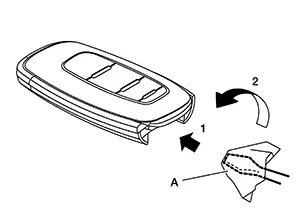
CAUTION:
-
Do not touch the circuit board or battery terminal.
-
The Intelligent Key is water-resistant. However, if it does get wet, immediately wipe it dry.
-
-
Replace the battery with new one.
Battery replacement
:Coin-type lithium battery (CR2032)
-
Align the tips of the upper and lower parts, and then push them together until it is securely closed as shown.
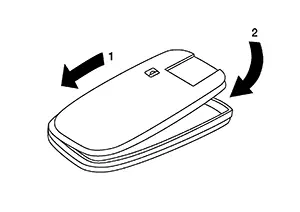
CAUTION:
-
When replacing battery, keep dirt, grease, and other foreign materials off the electrode contact area.
-
After replacing the battery, check that all Intelligent Key functions work normally.
-


Other materials:
Application Download
Once connected, the NissanConnectâ„¢ App will
search your phone to determine which compatible
applications are currently installed. The user
will then choose which apps they want to bring
into their vehicle from the list of apps within the
“Manage My Apps� section of the NissanConnect
â„¢ ...
Dtc Description
DTC Description
DTC DETECTION LOGIC
DTC No.
CONSULT screen terms
(Trouble diagnosis content)
DTC detection condition
...
Component Inspection
Component Inspection
CHECK POWER WINDOW RELAY
Ignition switch OFF.
Remove power window relay.
Check continuity between power window relay terminals.
...
