Nissan Sentra B18 (2020-2025) Service Manual: Additional Service When Replacing Transaxle Assembly
Description
Description
Perform the following work when the transaxle assembly is replaced. For work procedure, refer to Work Procedure.
WORK BEFORE TRANSAXLE ASSEMBLY REPLACEMENT
New transaxle assembly serial number checking
WORK AFTER TRANSAXLE ASSEMBLY REPLACEMENT
-
Calibration data (IP characteristics value) writing
Note:
TCM performs accurate control by retrieving data (inherent characteristic value) of each solenoid. For this reason, after replacing transaxle assembly, it is necessary to erase data stored in TCM and write new data.
-
Decel G sensor calibration
-
Clutch point learning
-
Torque converter clutch point learning
-
Select learning (Drive/Reverse learning)
-
CVT fluid degradation level data erasing
-
Vechie condition checking
Work Procedure
Work Procedure
Note:
-
ASIST on the CONSULT has been synchronized to the current date.
-
All CONSULT software updates (if any) have been installed.
-
CHECK SERIAL NUMBER OF NEW TRANSAXLE ASSEMBLY
Write down the serial number of new transaxle assembly.
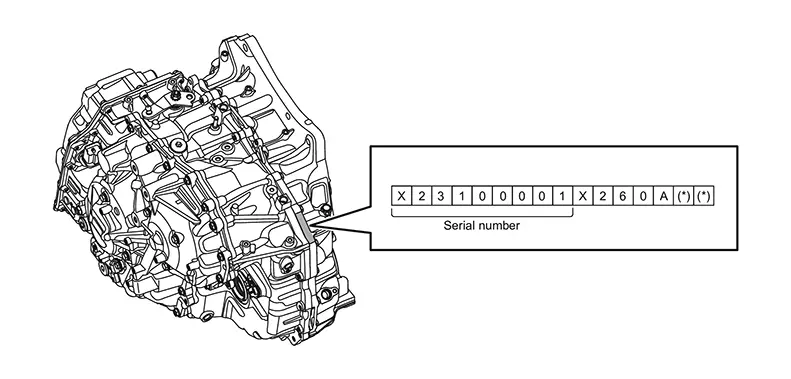 >>
>>
GO TO 2.
-
REPLACE TRANSAXLE ASSEMBLY
-
Ignition switch OFF.
-
Replace transaxle assembly. Refer to Removal and Installation.
GO TO 3.
-
-
WRITE CALIBRATION DATA (IP CHARACTERISTICS VALUE) - 1
Note:
Write data of new solenoid in TCM according to the following instructions:
 With CONSULT
-
Ignition switch ON.
-
Select “Work Support� in “TRANSMISSION�.
-
Select “WRITE IP CHARA - INPUT SERIAL NUMBER�.
-
Write data to the TCM according to the instructions on the CONSULT screen.
Note:
When the calibration data has been written to the TCM, the current status will indicate “Complete�.
-
Touch “End�.
Is the calibrationdata written successfully?
YES >>GO TO 7.
NO >>GO TO 4.
-
-
CHECK PRESENCE OF CD
Make sure the CD is included with the new transaxle assembly.
Is the CD included with the new transaxle assembly?
YES >>GO TO 5.
NO >>Retry step 3.
-
CHECK SERIAL NUMBER OF CALIBRATION FILE
With CONSULT-
Ignition switch ON.
-
Insert the supplied CD into CONSULT.
-
Select “Work Support� in “TRANSMISSION�.
-
Select “WRITE IP CHARA - REPLACEMENT AT/CVT�.
-
Select “OK� on the “Select IP characteristics data file� window.
-
Open the calibration file located on the supplied CD.
-
Confirm that the serial number (calibration file number) displayed on CONSULT screen matches the serial number on the transaxle assembly.
Note:
For the serial number on the transaxle assembly, check the alphanumeric characters in the 1st, 4th through 9th digits. (Example: X23100001 → X100001)
-
Select “Next� on the “WRITE IP CHARA - REPLACEMENT AT/CVT� Work Support screen.
GO TO 6.
-
-
WRITE CALIBRATION DATA (IP CHARACTERISTICS VALUE) - 2
Note:
Write data of new solenoid in TCM according to the following instructions:
With CONSULT-
Ignition switch ON, engine OFF.
-
Erase memory data from the TCM according to the instructions on the CONSULT screen.
-
Operate the ignition switch according to the instructions on the CONSULT screen.
-
Write data to the TCM according to the instructions on the CONSULT screen.
Note:
When the calibration data has been written to the TCM, the current status will indicate “Complete�.
-
Touch “End�.
GO TO 7.
-
-
PERFORM DECEL G SENSOR CALIBRATION
Perform Decel G Sensor Calibration. Refer to Work Procedure.
>>GO TO 8.
-
PERFORM CLUTCH POINT LEARNING
Perform Clutch Point Learning. Refer to Description.
>>GO TO 9.
-
PERFORM TORQUE CONVERTER CLUTCH POINT LEARNING
Perform Torque Converter Clutch Point Learning. Refer to Description.
>>GO TO 10.
-
PERFORM SELECT LEARNING (DRIVE/REVERSE LEARNING)
Note:
Always perform Clutch Point Learning before Select Learning.
Perform Select Learning. Refer to Work Procedure.
>>GO TO 11.
-
ERASE CVT FLUID DEGRADATION LEVEL DATA
With CONSULT-
Select “WORK SUPPORT� in “TRANSMISSION�.
-
Select “CONFORM CVTF DETERIORTN�.
-
Touch “Clear�.
GO TO 12.
-
-
CHECK Nissan Sentra Vehicle CONDITION
With CONSULTAfter completing the transaxle assembly replacement work, check if the Nissan Sentra vehicle is in normal condition.
-
Clear any DTCs that may have set.
-
Ignition switch OFF and wait for 10 seconds.
-
Start the engine and confirm that no CVT system warning is displayed.
-
Drive the Nissan Sentra vehicle in D position at 55 km/h (34 MPH) or more for 20 seconds. After that, confirm that DTC is not detected.
WORK END
-
Other materials:
Remote Keyless Entry Function
System Diagram
System Diagram
System Description
System Description
The Intelligent Key has the same functions as the
remote control entry system. Therefore, it can be used in the same
manner as the remote controller by operating the door lock/unlock
button.
OPERATION
Re ...
Shift Position Indicator Circuit
Component Parts Function Inspection
Component Parts Function Inspection
CHECK SHIFT POSITION INDICATOR
Start the engine.
Shift selector lever.
Check that the shift position and the
shift po ...
U0101 Can Comm Circuit
Dtc Description
DTC Description
CAN (Controller Area Network) is a serial communication line for
real time application. It is an on-Nissan Sentra vehicle multiplex communication line with
high data communication speed and excellent error detection ability. Many
electronic control un ...